
Server status (100% remediated)
Compliance view with all checks passed and the server in a secure state.
OpsHardening runs hardening and compliance checks on your Linux servers with a single operations dashboard. Less guesswork, more technical evidence for your infrastructure team.
Python 3.6+ script with no heavy stack on the server. Built for heterogeneous datacenters and short maintenance windows.
Checks aligned with hardening best practices: kernel, permissions, exposed services, and drift from your secure configuration.
Prioritize findings by severity, track remediation, and keep technical history for internal audits or frameworks like PCI-DSS.
Dashboard views showing green compliance and the workflow when items still need fixing — with clear guidance for administrators.
Compliance view with all checks passed and the server in a secure state.
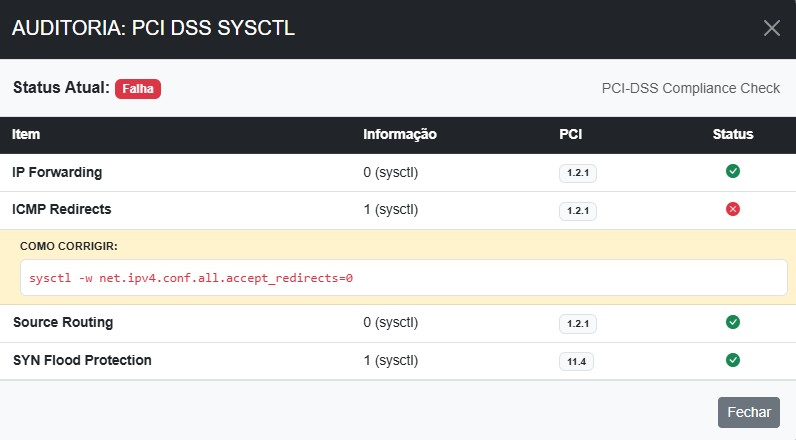
Example of a non-compliant item with evidence and steps to fix the failing control.
Clear answers about Linux hardening, the lightweight agent, and compliance.
A SaaS platform to apply and monitor hardening baselines on Linux servers (Red Hat, Ubuntu, SUSE), with a centralized dashboard for infrastructure and security teams.
The agent targets heterogeneous environments, focusing on Red Hat, Ubuntu, and SUSE. Checks cover kernel, permissions, exposed services, and configuration drift.
Yes. The dashboard prioritizes findings by severity and keeps technical history to support internal audits and server hardening requirements tied to PCI-DSS.
No. The agent is a lightweight Python 3.6+ script, suitable for datacenters with short maintenance windows.
Create a free account at https://opshardening.com.br/en/cadastro, install the agent on your servers with your company token, and review results in the web dashboard.